




Hot Games







Live Cards










Popular Games











Preparing Your Device for Fairplay App
Installations fail for predictable reasons, so the preparation pass checks each one in advance:
| Check | Target | Why it matters |
| Free storage | A few hundred MB clear | Cramped phones corrupt installs in odd ways |
| System version | Android 6.0 or newer for the APK | Older systems fall back to the browser |
| OS updates | Pending updates installed | Stale systems cause silent launch failures |
| Connection | Stable Wi-Fi or strong data | Interrupted downloads produce broken files |
| Unknown-sources setting | Located, not yet enabled | You will grant it once, deliberately, then revoke |
The last row carries the philosophy of the whole guide. Android ships with sideloading blocked, and that default is protective. Installing the Fairplay App means making one informed exception — for one verified file, from one verified source, with the permission granted to your browser and withdrawn after the install completes. It never means switching protection off as a lifestyle. Two more preparation notes earn their lines: keep the battery above a third or the phone on charge, since an install interrupted by shutdown leaves half-written files that confuse later attempts; and if the device carries anything irreplaceable, let the regular backup run first — not because the install threatens data, but because any system-level change is a good excuse for a habit that should exist anyway.
Step-by-Step Android APK Installation

Google Play does not distribute betting applications for this market, so the official site is the only legitimate source — a sentence worth re-reading, because every fake build in circulation depends on users forgetting it. The route:
- Type the official address or open your own bookmark; verify the spelling and the secure connection before anything else
- Locate the app section and begin the fairplay app download from that page only
- Expect the standard Android caution that APK files can harm the device — the message appears for every sideloaded file from every source, and your verified source is the reason to proceed
- When prompted, allow installation from this source: the unknown-apps permission, granted specifically to the browser that downloaded the file
- Open the file, confirm the installation, and wait for completion
- Launch once, confirm the app behaves, then revoke the unknown-sources permission in settings
Now the warning that earns its own paragraph. Fake APKs are this niche’s signature attack: files distributed through Telegram channels, WhatsApp forwards, forum threads, mirror catalogues, and ad landings, carrying the right icon and the wrong contents. The reliable tells:
- A source that is anything other than the official site
- A file name decorated with mod, hacked, unlimited, or pro unlocked
- A download that begins before you tapped anything
- A page demanding your Fairplay login or OTP before serving the file
- A “newer version” announced in a chat before the app itself mentions it
Any single tell is disqualifying. There is no curiosity discount on a file that handles your money. The economics explain the persistence: a convincing fake costs its builder a weekend and returns harvested credentials for months, which is why new copies appear faster than old ones get reported. The defence does not need to outpace them — it only needs to never download from anywhere but the one source that cannot be impersonated by definition.
iOS Installation Guide
The iOS section is short because honesty makes it short: no official Fairplay application exists in the Apple App Store, and listings claiming otherwise are imitations to be reported, not downloaded. iPhone and iPad users work through Safari, and the experience holds up — the mobile site carries the full platform: account, Cashier, sports, casino, settings, support. Nothing in that list is a reduced version; the same servers answer the browser that would answer an app, which is why the absence of a store listing costs less than it sounds.
For the app feeling without an app, the home-screen route covers it. Open the official site in Safari, tap Share, choose Add to Home Screen, confirm — and an icon joins your apps, opening the platform in its own clean window. Performance on iOS tracks two things: the connection quality and the system version, so keeping iOS and Safari current is the entire maintenance routine. The shortcut also survives site updates gracefully — because it opens the live site rather than a frozen copy, every visit lands on the current version with nothing to reinstall, which is the quiet advantage of the browser model over any archive of builds. What stays forbidden on Apple’s side mirrors the Android rule: no configuration profiles from outside Apple, no “enterprise certificate” installs, no third-party app stores promising a native build — that machinery is the standard fake-delivery channel on iOS, and the browser route makes it unnecessary anyway. Older devices that struggle with heavy pages improve with the basics: close background tabs, clear Safari’s cache occasionally, and prefer Wi-Fi for live sections.
Updating Fairplay App Safely
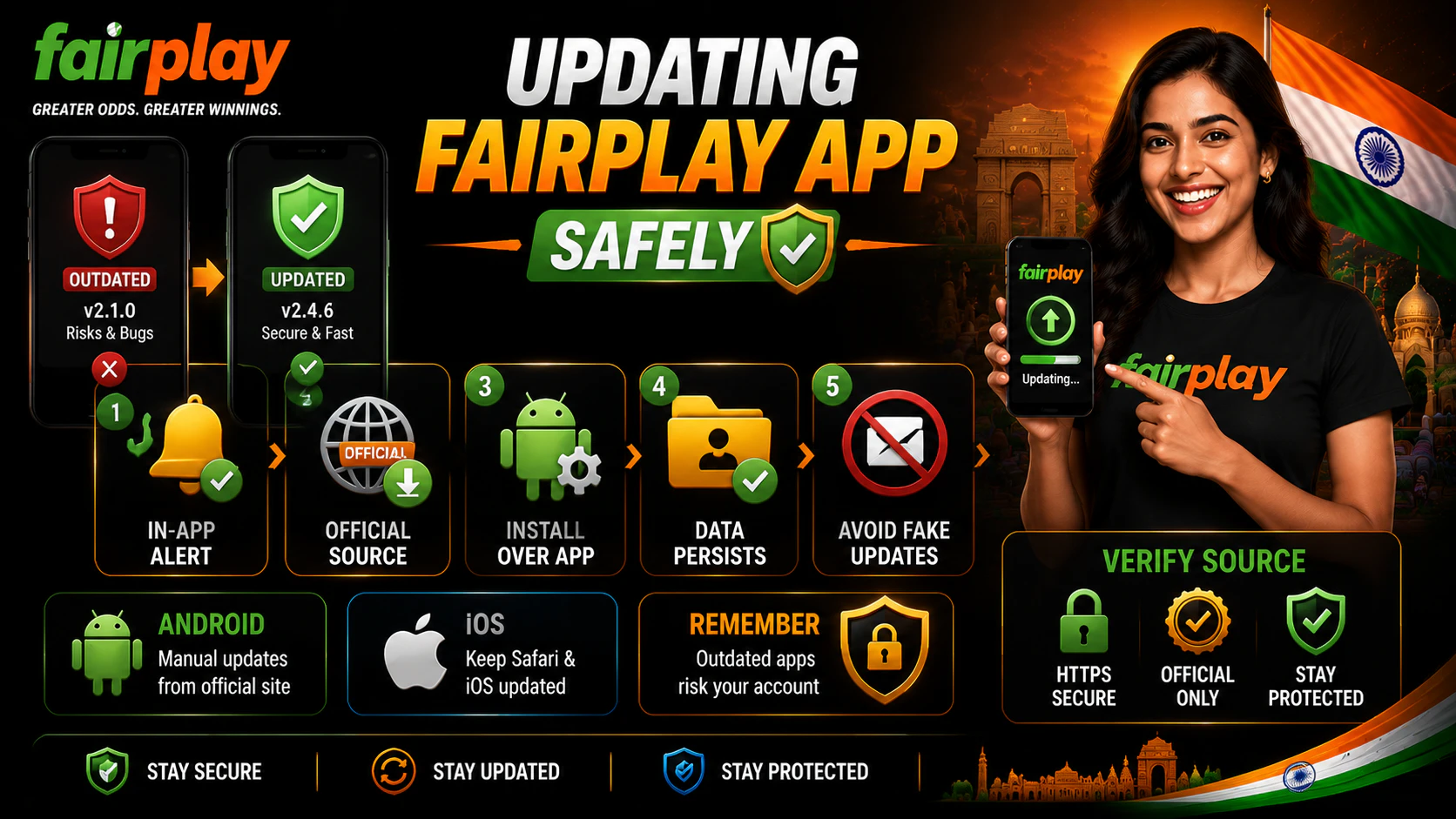
An outdated app is a slowly opening door — old builds miss security patches, accumulate bugs, and eventually lose compatibility with the platform’s server side. Since the Android app lives outside Google Play, updates do not install themselves, and the safe loop is manual:
- Treat the in-app update prompt as the only trustworthy announcement of a new version
- Download the fresh APK from the official site, repeating the same source verification as the first install
- Install over the existing app — account, login, and settings persist through a normal update
- Reject every update offer that arrives by SMS, messenger, email, or third-party pop-up, because fake updates are the fake-APK attack wearing a maintenance costume
The iOS equivalent is passive: the site updates server-side, and the user’s whole job is keeping Safari and the system current. On either platform, the operative version is the one the official source distributes today — archived builds in APK catalogues are where vulnerable and tampered versions go to wait for downloaders, and a money-handling app runs current or not at all. A reasonable rhythm: check for the in-app prompt whenever a session starts after a gap of weeks, and treat any sudden behaviour change — features missing, screens redesigned without an update — as a cue to verify the installed build against the official site rather than to shrug.
Troubleshooting Installation Issues
Most failures resolve in two moves once the cause is named:
| Issue | Try first | If it persists |
| Download will not complete | Switch to stable Wi-Fi, restart the download | Clear browser cache, retry from the official page |
| Install blocked | Grant unknown-sources to the downloading browser | Check Android version meets 6.0, free up storage |
| “App not installed” error | Delete the file, re-download fresh | Remove any older version first, then install |
| App installs but will not launch | Restart the phone | Update the OS, reinstall the current build |
| Crashes or freezes mid-use | Close background apps, clear the app cache | Reinstall cleanly from the official site |
| Conflicts after a system update | Update the app to the latest build | Clean reinstall: remove, re-download, install |
Two escalation rules sit under the table. First, the clean reinstall — uninstall, re-download from the official site, install fresh — outperforms every exotic fix and is always safe to try. Second, when even that fails, the platform’s support through the official site is the next stop, armed with your device model, OS version, and a one-line description of where the process breaks. The move that never appears in this section: trying “the same” APK from an alternative catalogue to see whether that copy behaves better. It is a different file with a familiar name, and the experiment risks exactly what this guide exists to protect. Patience with the official route — a clean reinstall, a support ticket, even a day’s wait for an answer — is always cheaper than the alternative’s worst case, and the worst case is the realistic one.